Hafilat Recharge: Online & Offline Card Top-Up Guide 2026
Hafilat recharge is an essential service for commuters using Abu Dhabi’s public bus system, allowing users to top up their smart travel card quickly and conveniently. The Hafilat card is a contactless payment solution that stores balance digitally and automatically deducts fares during travel. With multiple recharge options such as online portals, mobile apps, vending machines, and retail outlets, passengers can easily maintain their balance anytime.
This modern system ensures cashless, fast, and hassle-free transportation, making daily travel across Abu Dhabi more efficient for residents, workers, and tourists alike.
Hafilat Recharge Online
Enter your 16-digit card number
Redirecting you securely to the official Abu Dhabi government portal.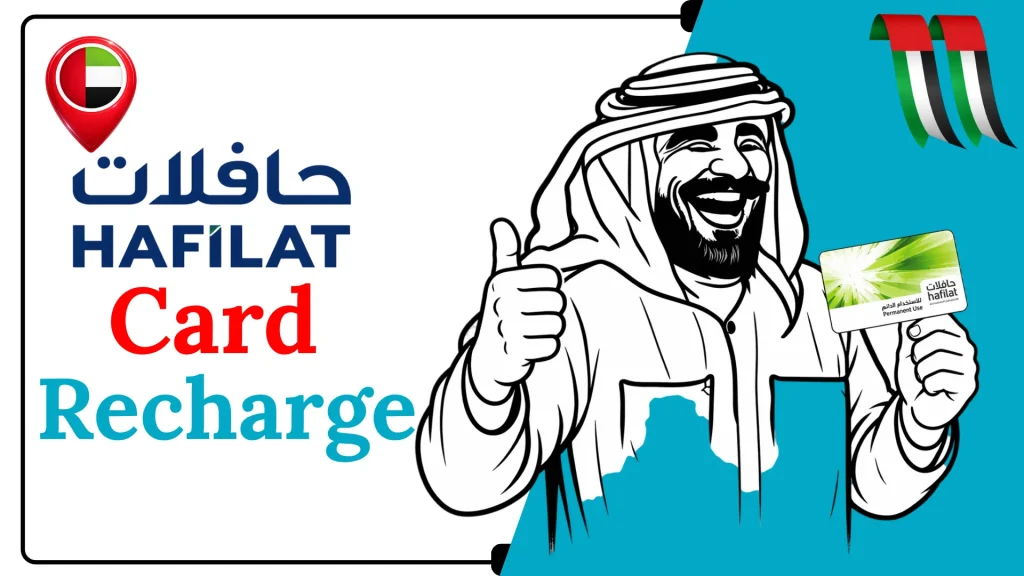
Why Hafilat Recharge Matters in Abu Dhabi
Keeping your Hafilat card topped up is more than just a convenience; it is a practical necessity for smooth, uninterrupted travel in Abu Dhabi. Here’s why it matters:
Types of Hafilat Recharge in Abu Dhabi
Here are the types of Hafilat recharge you can choose to enjoy your travel easily.
1. Pay-Per-Trip (Stored Value/T-Purse)
This is the basic top‑up balance stored on your card. You load money (prepaid credit) onto the card. Every time you travel, you tap in (and often tap out), and the fare is automatically deducted. Valid until used, but you must use the balance before it expires (typically within a few months).
2. Time‑Based Travel Passes
Instead of paying for each ride, you can buy a pass-based recharge that lets you travel unlimitedly within a set period.
Weekly Pass
Monthly Pass
Annual & Other Long-Term Passes
3. Special Category Passes
Some passes or discounted recharge types are designed for certain users:
How to Recharge Hafilat Card Online
Here is the simple online method to recharge a Hafilat card online.
Method 1: Hafilat Recharge Via Hafilat Website
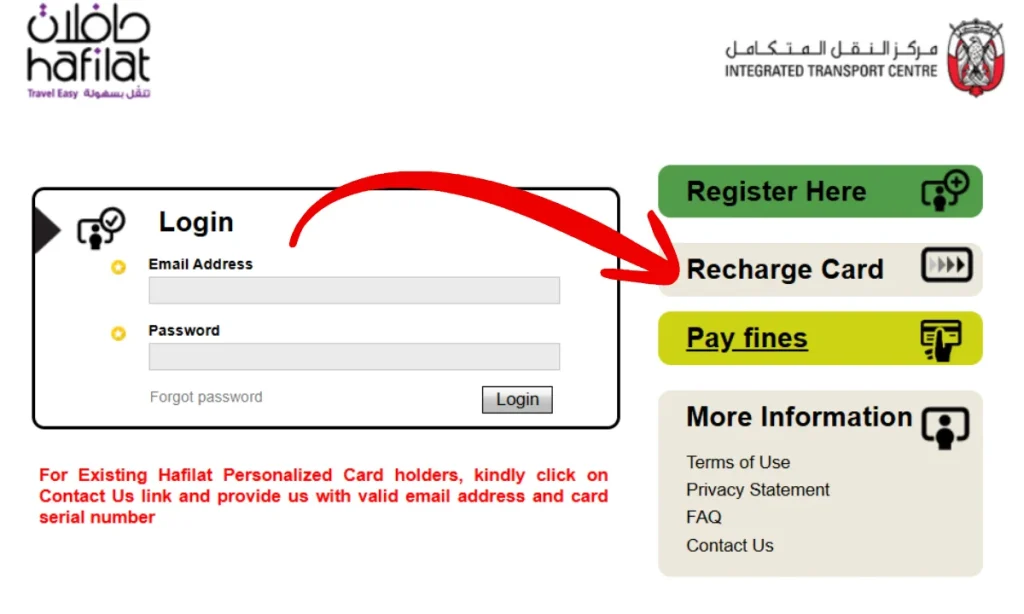
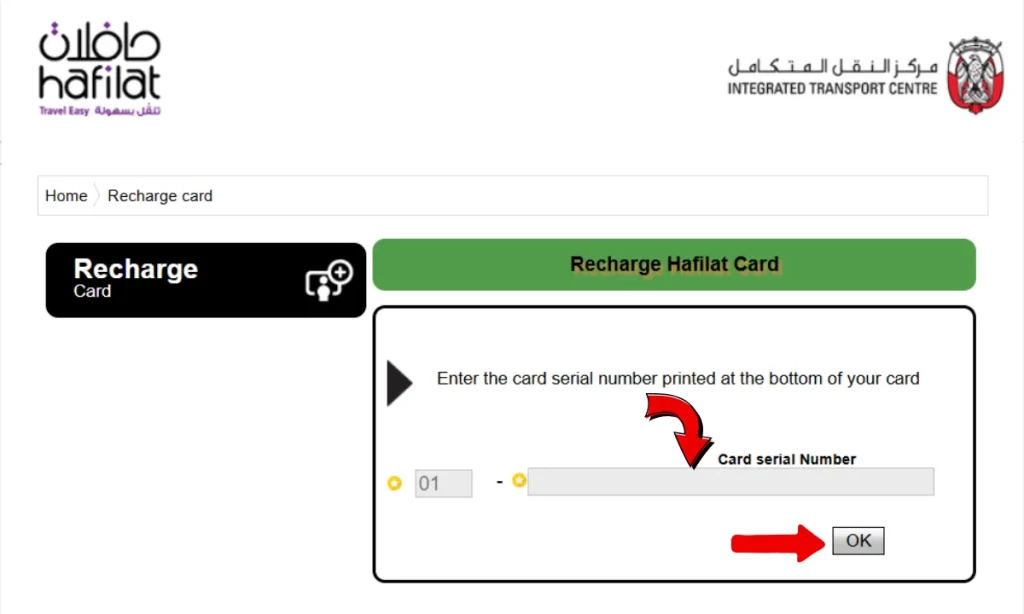
Note: Enter the correct serial number of your hafilat card without making any mistakes. The card number is available on the back of the card
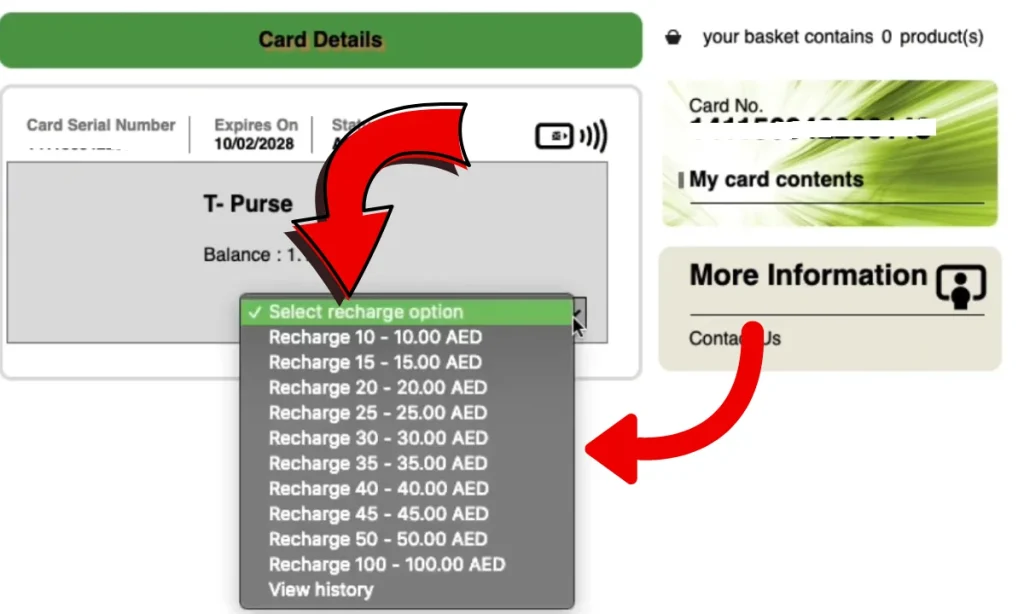
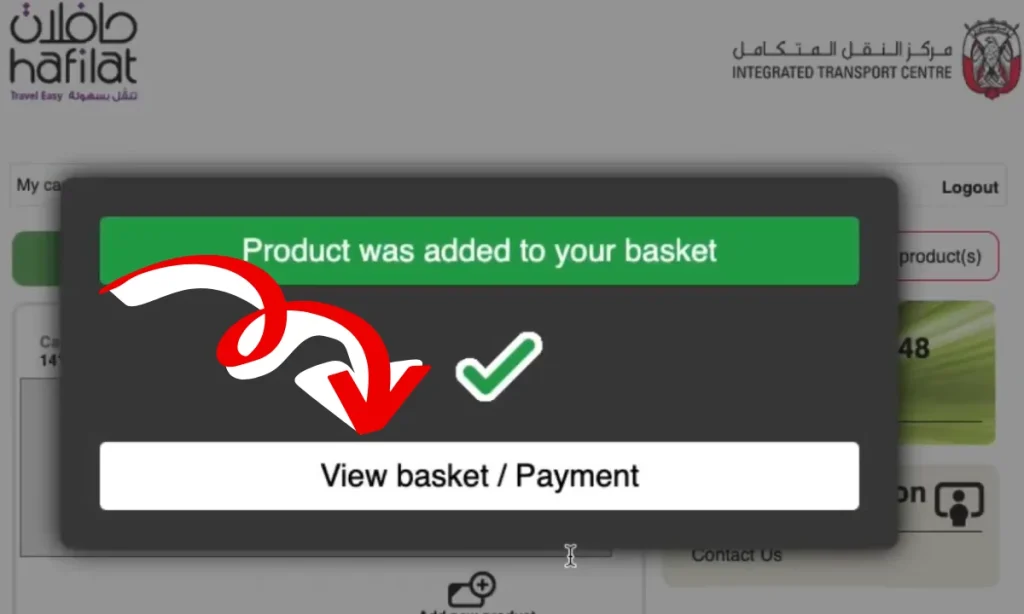
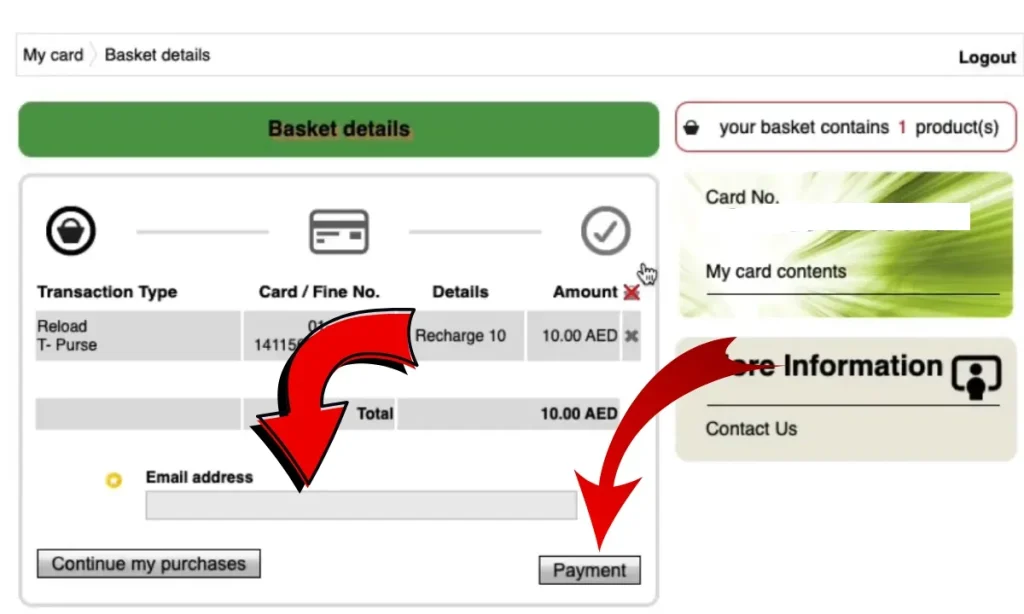
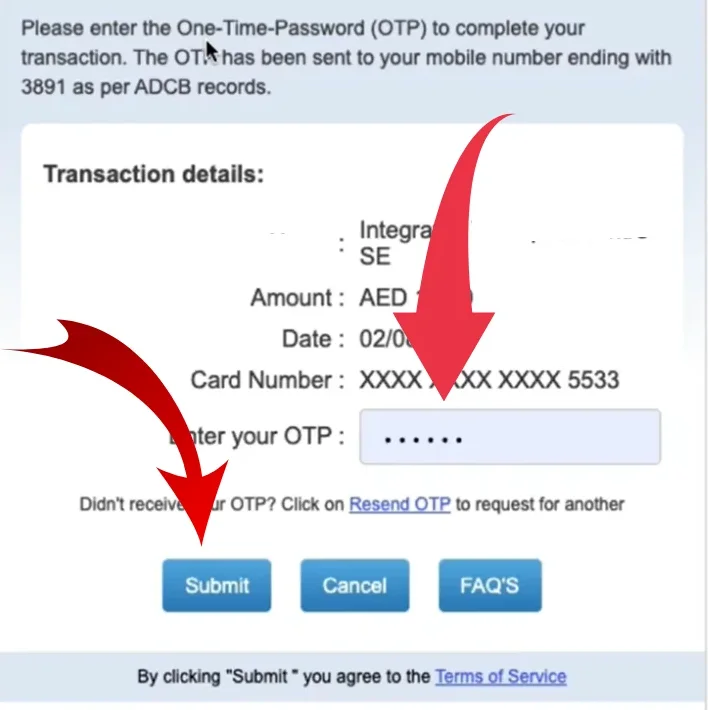
Note: Recharging through the official website is one of the safest and most convenient methods.
Method 2: Hafilat Recharge Online Via Tamm Website
Note: Your recharge will be activated after approximately 2 hours
Method 3: Hafilat Recharge Online Via the Drabi App


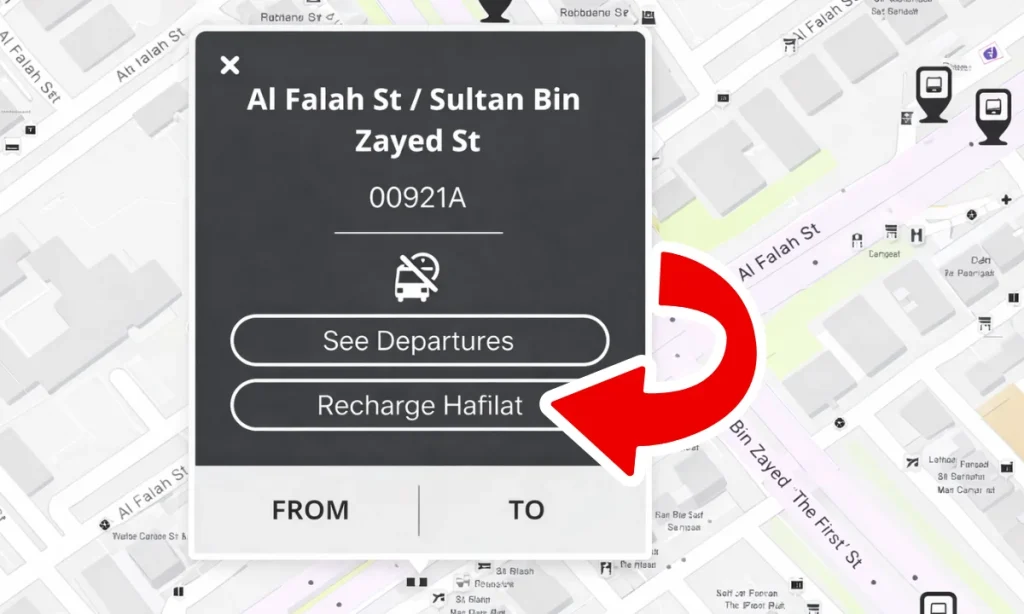
Method 4: Hafilat Recharge Via PayIt App
Offline Hafilat Card Recharge Process
Here is the simple online method to recharge a Hafilat card offline.
Method 1: Hafilat Recharge Via Banknote Reloader
Banknote Reloader (BR) kiosks are self-service machines designed for cash-only Hafilat card recharge. These machines allow users to quickly add money to their Hafilat cards without needing internet access or banking services. BR kiosks are conveniently located across Abu Dhabi’s public transport network, including bus stations, shopping malls, and major transport hubs.
Process
How the Banknote Reloader machine work
Method 2: Hafilat Recharge Via Ticket Vending Machines
If you want your balance updated instantly, use Ticket Vending Machines (TVMs) available at
Process
How the Ticket Vending Machines Work
The user selects the destination and ticket type on screen. The machine calculates the ticket price. User inserts cash or uses card/mobile payment. Payment is checked (coins, notes, or card verified). The machine confirms the correct payment was received. The ticket is printed using a thermal printer. The ticket is dispensed through the output slot. Change is returned if extra money is paid. Invalid money is rejected. Errors (jam or failure) show message or refund.
Method 3: Hafilat Recharge Via Customer Happiness Centers
Unlike online recharge options that can take up to a day or two, topping up your Hafilat card at a Customer Happiness Center is instant. If you’re about to travel and need a quick recharge, this is the most convenient option.
Process
Method 4: Hafilat Recharge Via Authorized Retail Outlets
If you’re trying to recharge your card, look for:
How Authorized Retail Outlets work
Just head to any authorized Hafilat retailer or service point. When you get there, go to the customer service counter, show your card, and tell them the amount you want to recharge. You can pay by cash or card, and the staff will handle the rest. Depending on the location, it may take up to 24 hours for the recharge to reflect.
Note: Always recharge at official or authorized locations. Never hand your card to unknown parties or use unofficial third-party recharge services. Fraud risk is real; only use government platforms, official apps, or listed authorized retailers.
Method 5: Hafilat Recharge Via MBME Recharge Machines
How MBME Recharge Machines work
The machine sends your recharge request to the central transport system. The payment is processed and stored digitally. When you tap your card later (bus or validator), the system syncs and updates your balance.
Hafilat Recharge Via Video Guide
Hafilat Recharge Limits in Abu Dhabi
Before adding money to your Hafilat card, there are a few key rules you need to know:
Available Hafilat Recharge Amounts in Abu Dhabi
When topping up your Hafilat card whether online via the Darb portal, through the DARBI app, or at a Ticket Vending Machine you can choose from the following predefined amounts:
| Amount | Best For |
|---|---|
| AED 10 | Single day, occasional use |
| AED 15 | 2–3 days of travel |
| AED 20 | Short week of commuting |
| AED 25 | Regular few-day top-up |
| AED 30 | Light weekly commuter |
| AED 50 | Regular weekly commuter |
| AED 100 | Frequent traveler, 2–3 weeks |
| AED 150 | Maximum load, heavy daily use |
Which Option of Hafilat Recharge Is Right for You?
Choosing between pay-per-trip credit and a pass depends entirely on how often you travel:
Hafilat Recharge Passes Unlimited Travel at a Fixed Price
If you travel on Abu Dhabi buses frequently, a period pass is far more economical than paying per trip every time. Hafilat currently offers two pass options that provide unlimited travel across all Abu Dhabi city bus routes.
| Pass Type | Price | Duration | Best For |
|---|---|---|---|
| Weekly Pass | AED 35 | 7 days | Short-term visitors, weekly commuters |
| Monthly Pass | AED 95 | 30 days | Daily commuters, residents |
Tips For Smooth Hafilat Recharge in Abu Dhabi
Here are some useful tips for Hafilat recharge to help you do it smoothly and without any issues.
1. Check Your Balance Before Leaving Home
Open the DARBI app to view balance in real time Log into hafilat.darb.ae and enter your card serial numberTap card at any TVM and select balance check Tap on bus validator remaining balance shows after each journey.
2. Activate Balance After Online Recharge
Tap your card on any TVM or bus validator after recharging online .Balance does not go live until this activation tap is done .Activate before reaching the bus stop not at the last minute.
3. Keep Minimum AED 10 on Your Card
4. Switch to a Pass If You Travel Daily
5. Recharge in Larger Amounts
6. Register Your Card to Protect Your Balance
Visit hafilat.darb.ae and log in with UAE PASS .Link card serial number to your Emirates ID. Balance becomes recoverable if card is lost or damaged .Report lost card at any Customer Happiness Center immediately
7. Use the DARBI App for Quick Recharge
Download from Google Play Store or Apple App StoreEnable low balance alerts to avoid running out Save card serial number for one-tap future recharges .load passes directly from the app without visiting a TVM.
8. Only Use Official Recharge Channels
9. Avoid MBME Machines Before Travel
MBME recharges may take up to 2 hours to reflect on your card. Avoid using MBME if you plan to travel within the next 2 hours. For immediate top-ups, use a TVM or the DARBI app.
10. Always Tap Out When Exiting
Tap card on validator when getting off every bus Forgetting to tap out triggers maximum fare deduction .Check transaction history in DARBI app for missed tap-outs.
11. Watch Your Balance Expiry
Balance expires 3 months from last recharge date Use card at least once every 3 months to stay active. Check expiry via Darb portal or DARBI app .Call 800 88888 if balance has expired unexpectedly.
FAQs About Hafilat Recharge
How can I recharge my Hafilat card?
You can recharge your Hafilat card online through the official Darb website or the Darbi app, as well as via the payit app or TAMM kiosks. For offline options, use recharge machines available at bus stations and shelters. Simply enter your 10-digit card number, choose the amount, and complete the payment your balance will update within minutes.
How to recharge Hafilat using darbi?
Download the Darbi app from the Google Play Store (Android) or the Apple App Store (iOS – UAE).
After installing, register or log in to your account, then go to the “Public Transport” section.
Tap the plus (+) icon at the bottom right, select “Recharge Hafilat,” and enter your card serial number.
Can we recharge a Hafilat card online?
Yes, you can recharge your Hafilat card online via the official Darb website, the Darbi app, or the Payit mobile wallet. To top up, simply enter your 16-digit card serial number and pay using a credit/debit card or a digital wallet.
Conclusion
Hafilat recharge keeps Abu Dhabi’s public transport system running smoothly by ensuring passengers travel without interruptions or delays. With flexible top-up methods and smart payment options, it simplifies commuting for everyone. Staying recharged means staying mobile, making daily journeys more reliable, efficient, and perfectly aligned with the city’s modern, cashless transport vision.
Sources
Hafilat (https://hafilat.darb.ae/)
TAMM( https://www.tamm.abudhabi/)
Darbi App
Payit App
Customer Happiness Centers
Ticket Vending Machines (TVMs)
MBME Recharge Machines
Authorized Retail Outlets
Banknote Reloader

Noura al Noman 
I’m Noura Al Noman, an author at hafilatbalancechecksae.com. I write clear and informative guides about Hafilat balance checks, card services, and public transport in the UAE. My goal is to provide accurate, user-friendly information that helps readers complete tasks quickly and easily.