Hafilat Card Suddenly Stopped Working: What to Do 2026


 May 25, 2026 3:21 pm
Hafilat Card Suddenly Stopped Working? If your Hafilat card suddenly stops working, don’t panic. This is a common issue faced by daily commuters in Abu Dhabi, and in most cases, it can be resolved within minutes. Whether you rely on the Hafilat card for buses, the Abu Dhabi Metro, or other public transport services, a non-functional card can disrupt your entire day. This guide walks you through every possible reason your Hafilat card may have stopped working and exactly what to do about it.
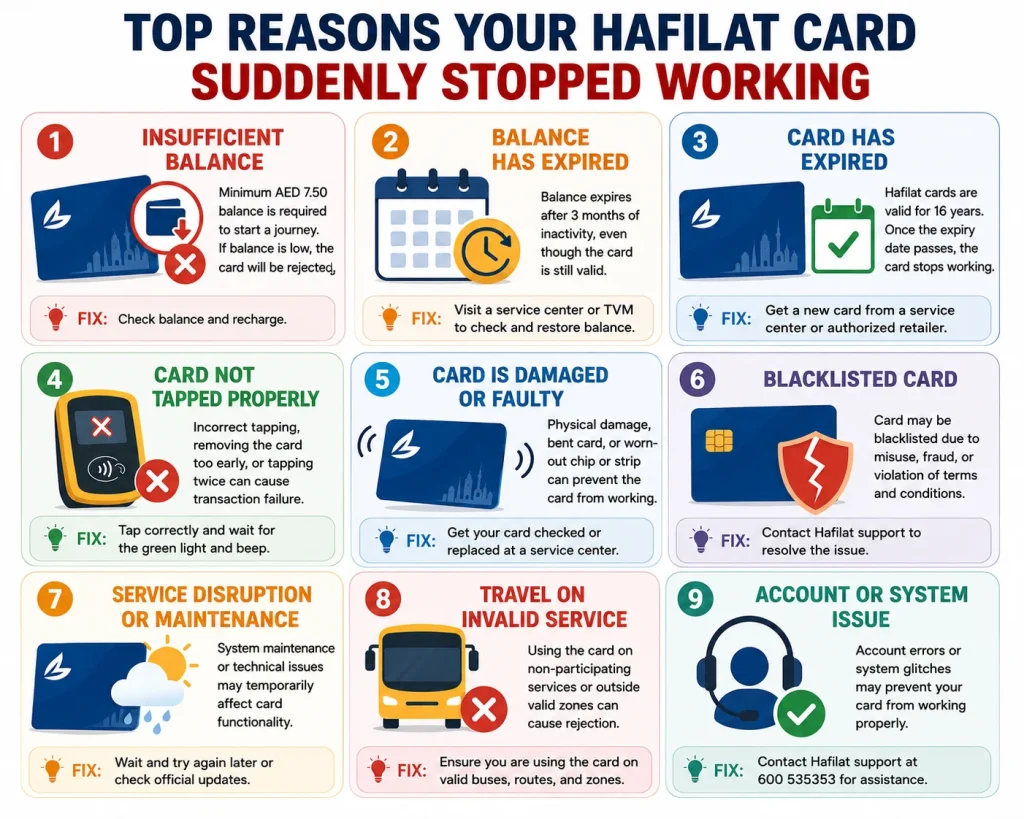
Top Reasons Your Hafilat Card Suddenly Stopped Working
Here is a full breakdown of every common reason a Hafilat card suddenly stops functioning, along with the instant fix for each:
1. Insufficient Balance (Most Common Reason)
The single most common reason a Hafilat card stops working is an insufficient balance. Abu Dhabi’s transport system requires a minimum balance of AED 7.50 on your card before you can begin a journey. Even if you have a small amount left, say AED 3 or AED 5, the system will still reject your card.
Many commuters are surprised when their card is declined despite having some money on it. This happens because the minimum balance rule acts as a travel buffer, ensuring the system can deduct the full fare without going into deficit.
What to do:
2. Balance Has Expired
This is one of the least-known but most impactful issues. The physical Hafilat card itself is valid for 16 years, but the balance you load onto it expires after 3 months of inactivity. If you have not used your card for three months or more, the credit on it may no longer be valid even though the card itself appears fine.
This often surprises occasional travelers or those who return from a trip abroad and find their previously topped-up card is no longer working.
What to do:
3. Card Has Physically Expired or Needs Renewal
Although Hafilat cards last 16 years, they do have an expiry date printed on the front. Once that date passes, the card stops working at bus validators entirely even if you have a healthy balance loaded on it.
An expired card is different from a low-balance card. The validator will reject it regardless of how much money is stored on it.
What to do:
4. Physical Damage to the Card
Hafilat cards contain an embedded contactless chip. If this chip is cracked, bent, scratched, or exposed to extreme heat or magnetic interference, it may fail to communicate with the validator properly. Water damage, sitting on the card, or storing it in a wallet packed with other cards can all cause this over time.
Dirt or grime on the card surface can also interfere with the tap-and-go reading process.
What to do:
5. Magnetic Interference From Other Cards
Storing your Hafilat card directly next to other contactless cards, bank cards, or electronic devices (like a phone with NFC) can sometimes cause interference and temporarily disrupt the card’s functionality.
What to do:
6. Card Has Been Blocked
If a Hafilat card has been reported as lost or stolen, the ITC system will block it immediately to prevent misuse. Sometimes, account holders block a card and later find it, only to discover it is now non-functional.
A card can also be blocked due to irregular activity or an administrative hold in rare cases.
What to do:
7. Temporary System or Reader Error
Occasionally, the issue is not with your card at all; it is with the bus validator or the system itself. If a particular bus or station reader is malfunctioning, it may reject valid cards. This is a less common but documented situation.
What to do:
8. Wrong Card Type for the Route
Certain Hafilat card types are limited in their usage. For instance, temporary Hafilat cards or anonymous cards may have restrictions on specific intercity or regional routes between Abu Dhabi, Al Ain, and Al Dhafra. If you are trying to use your card on a route it is not designed for, the system will decline it.
What to do:
You can also check why your Hafilat recharge successful but the Hafilat balance is missing by clicking the given link.
note
What to Do When Your Hafilat Card Stops Working in Abu Dhabi
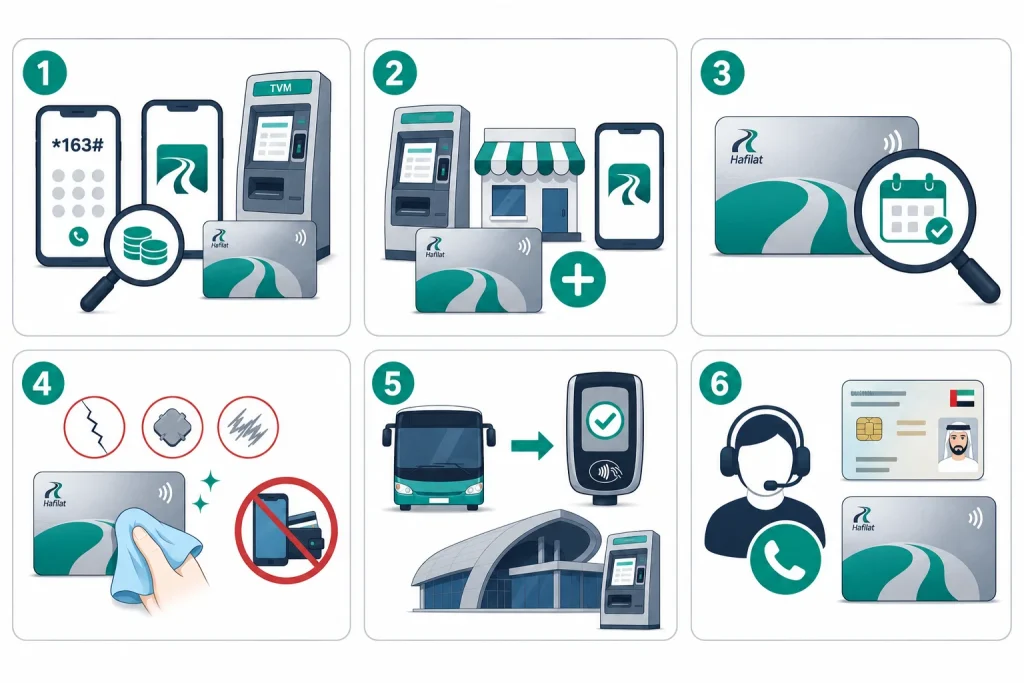
Follow this checklist in order for the fastest resolution:
Can Hafilat Balance Be Recovered From a Non-Working Hafilat Card?
In many cases, yes. If the card is readable in the system, the remaining balance may be transferable to a replacement card.
This depends on:
That’s why it’s important not to throw away the card immediately. Keep it with you until support confirms whether balance can be recovered.
What Should You Do Immediately if Your Hafilat Card Stops Working on the Bus?
If this happens during travel:
Tips to Prevent Your Hafilat Card From Stop Working in the Future
Being proactive saves you time and frustration. Here are practical habits every regular commuter should adopt:
How to Contact Hafilat Support if your Hafilat Card Suddenly Stopped Working
| Contact Method | Details |
|---|---|
| Phone (Abu Dhabi) | 600 535353 |
| General Complaint Line | 800 555555 |
| Official Portal | hafilat.darb.ae |
| Mobile App | Darbi (available on iOS & Android) |
| In-Person | Hafilat Customer Service Centers at major stations |
| USSD Code Hafilat Balance Check | *163# (any phone, no internet required) |
FAQs About Hafilat Card Suddenly Stopped Working
Can I get a refund if my Hafilat card is not working?
If your card is a personalized one and cannot be repaired or renewed, the ITC may process a refund for the remaining valid balance. Contact 600 535353 for specific guidance on your situation.
Can I use my Hafilat card if I just recharged it but it still isn’t working?
After a recharge, allow 2–5 minutes for the system to sync. If the issue persists after 10 minutes, contact Hafilat support or visit a service center.
Why did my Hafilat card suddenly stop working?
The most common reasons are insufficient balance (below AED 10), a pending online top-up that hasn’t synced yet, a missed tap-out on a previous trip, or an expired card. In rare cases, the card may be physically damaged or blocked by the system.
Conclusion
If your Hafilat card suddenly stops working, the issue is usually easy to fix. From low balance and expiry to card damage or system errors, most problems can be resolved quickly. Check your balance, inspect the card, and contact support if needed to get back to traveling without delays or stress.
Source
Hafilat hafilat.darb.ae
Hafilat customer service center
Noura al Noman
I’m Noura Al Noman, an author at hafilatbalancechecksae.com. I write clear and informative guides about Hafilat balance checks, card services, and public transport in the UAE. My goal is to provide accurate, user-friendly information that helps readers complete tasks quickly and easily.