Why Does Your Hafilat Balance Show Different Amounts? Guide 2026


 June 20, 2026 12:10 pm

Hafilat Balance Show Different Amounts? If you’ve ever checked your Hafilat card balance and noticed that it displays different amounts at different times, you’re not alone. Many commuters in Abu Dhabi experience this issue and wonder whether their card is malfunctioning or if money has been deducted incorrectly. The good news is that, in most cases, there is a perfectly valid explanation. Understanding how the Hafilat system works can help you avoid confusion and ensure you’re always aware of your available travel balance.
In this comprehensive guide, we’ll explain why your Hafilat balance may appear different, how the payment system works, common causes of balance discrepancies, and what you should do if you believe there is an actual error.
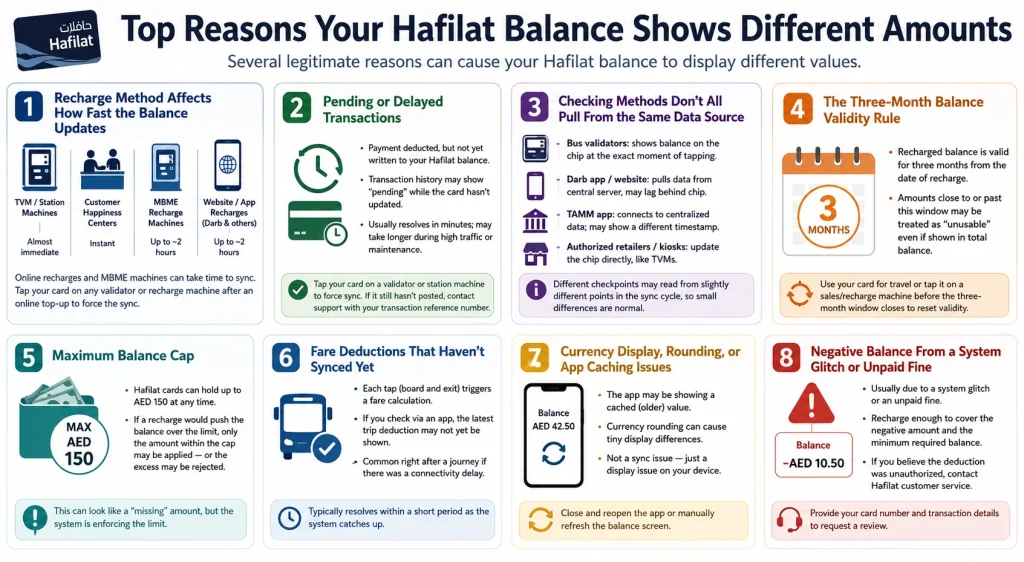
Top Reasons Your Hafilat Balance Shows Different Amounts
Several legitimate reasons can cause your Hafilat balance to display different values.
1. Recharge Method Affects How Fast the Balance Updates
Not all recharge channels update your balance at the same speed. This is the single biggest reason for mismatched balances right after a top-up.
If you recharge online and immediately try to board a bus, the validator may still show your old balance until the card physically syncs with the backend. This is exactly why many transit authorities advise tapping your card on any validator or recharge machine shortly after an online top-up, just to force the sync.
2. Pending or Delayed Transactions
Sometimes a recharge transaction is deducted from your bank account or wallet but has not yet been written to your Hafilat balance. During this window, your transaction history might show the payment as “pending,” while the card itself has not yet reflected the new amount. This typically resolves within a few minutes, but during high traffic periods or system maintenance, it can stretch longer.
If a recharge shows as pending for an extended period, the standard troubleshooting step is to tap the card on a validator or station machine, which often forces the system to finalize the sync. If the balance still has not posted after that, contacting support with your transaction reference number is the next step.
3. Checking Methods Don’t All Pull From the Same Data Source
This is a major but often overlooked reason for “different balances.” Hafilat balance can be checked through multiple channels, and not all of them pull live data:
Because each of these checkpoints might be reading from a slightly different point in the sync cycle, it is entirely normal to see your balance differ by a few dirhams between an app and a physical tap, especially within minutes of a transaction.
4. The Three-Month Balance Validity Rule
Abu Dhabi Mobility has confirmed that a recharged balance on a Hafilat card is valid for three months from the date of the recharge. If a portion of your balance is close to or past that validity window, the system may adjust what is treated as “usable” balance versus what is displayed as total balance, leading to a discrepancy between what you see and what you can actually spend on a fare.
To avoid losing validity on recharged amounts, simply use the card for travel or tap it on a sales/recharge machine before the three-month window closes, which resets the active validity period.
5. Maximum Balance Cap
There’s a cap on how much balance a Hafilat card can hold at any time, generally up to AED 150. If you attempt to recharge an amount that would push your balance over this cap, the system may only apply the portion of the recharge that fits under the limit, or it may reject the excess. This can create the appearance of a “missing” amount if you are not aware of the cap, when in reality the system simply did not apply the full recharge value.
6. Fare Deductions That Haven’t Synced Yet
Every time you tap to board and tap to exit, a fare calculation happens. If you traveled recently and then checked your balance through an app rather than tapping a validator, the displayed balance might not yet reflect that most recent trip’s deduction, especially if your last tap-out had a connectivity delay. This is common immediately after a journey and typically resolves within a short period as the system catches up.
7. Currency Display, Rounding, or App Caching Issues
Occasionally, what looks like a balance mismatch is simply an app showing a cached (older) value because it has not refreshed since you last opened it. Closing and reopening the app, or manually refreshing the balance screen, often resolves this instantly. This is different from an actual sync delay between the card chip and the server — it is purely a display issue on your device.
8. Negative Balance From a System Glitch or Unpaid Fine
In rare cases, a balance might show as negative. This generally happens if a passenger boarded with insufficient funds due to a system glitch or if there is an unpaid fine attached to the card. If you notice a negative balance, the recommended steps are to recharge enough to cover both the negative amount and the minimum required balance, and if you believe the deduction was unauthorized, to contact Hafilat customer service to dispute the charge and request a transaction review.
How to Confirm Your Real Hafilat Balance in Abu Dhabi
Since different checking methods can show slightly different numbers depending on sync timing, here is the most reliable order of verification:
What Should You Do If the Hafilat Balance Still Looks Wrong?
If the balance remains incorrect after waiting, follow these steps:
Most discrepancies are resolved without requiring card replacement.
Can a Hafilat Card Lose Money Automatically?
Not usually. Money is deducted only for:
Tips to Avoid Hafilat Balance Show Different Amounts Confusion
FAQs About Your Hafilat Balance Show Different Amounts
Why did my balance not update right after I recharged online?
Online recharges can take a short while, sometimes up to around two hours in rare cases, to fully sync with the card. Tapping the card on any validator or recharge machine usually speeds this up.
What should I do if my balance shows differently on the app versus the bus validator?
Treat the validator reading as the most current, since it reflects the chip directly. If the app shows a different number for more than a day, or if you see a transaction you do not recognize, contact Hafilat customer support with your transaction reference.
What if my balance shows as negative?
This can happen due to a rare system glitch or an unpaid fine. Recharge enough to cover the negative balance plus the minimum required amount, and contact customer service if you believe the deduction was incorrect.
Conclusion
Understanding why your Hafilat balance shows different amounts helps you avoid unnecessary confusion during travel. Most discrepancies result from synchronization delays, pending top-ups, or recent fare processing rather than system errors. By using official balance-check methods, keeping recharge records, and allowing updates to complete, you can manage your Hafilat card confidently and efficiently.
Source
Hafilat https://hafilat.darb.ae/
Customer Happiness Centers
Ticket Vending Machines (TVM)
Noura al Noman
I’m Noura Al Noman, an author at hafilatbalancechecksae.com. I write clear and informative guides about Hafilat balance checks, card services, and public transport in the UAE. My goal is to provide accurate, user-friendly information that helps readers complete tasks quickly and easily.