Hafilat Darbi App: Everthing You Need To Know 2026


 May 14, 2026 2:53 pm
The Hafilat Darbi App in Abu Dhabi is a powerful smart mobility solution designed to make daily travel easier and more efficient. Whether you are a resident or a tourist, the app offers real-time bus tracking, route planning, Hafilat card balance checks, and quick online recharges. With added features like parking payments and taxi booking, the Darbi app ensures a smooth, cashless, and hassle-free transport experience across Abu Dhabi.
What is the Darbi App?
DARBI (formerly known as DARB) is the official transportation app for the Emirate of Abu Dhabi, developed by the Integrated Transport Centre. It serves as a smart, pocket-sized mobility solution, offering comprehensive information to support your journey across air, land, and sea. The name “DARBI” is derived from the Arabic word for “my road” or “my path,” which perfectly encapsulates its purpose to guide residents and visitors through every aspect of transportation in the emirate of Abu Dhabi.
Why Darbi App is Essential for Abu Dhabi Travelers
Features of the Hafilat Darbi App
The Darbi app is not just a bus tracking tool; it is a comprehensive mobility platform. Here is a breakdown of its most important features:
1. Interactive Map Navigation
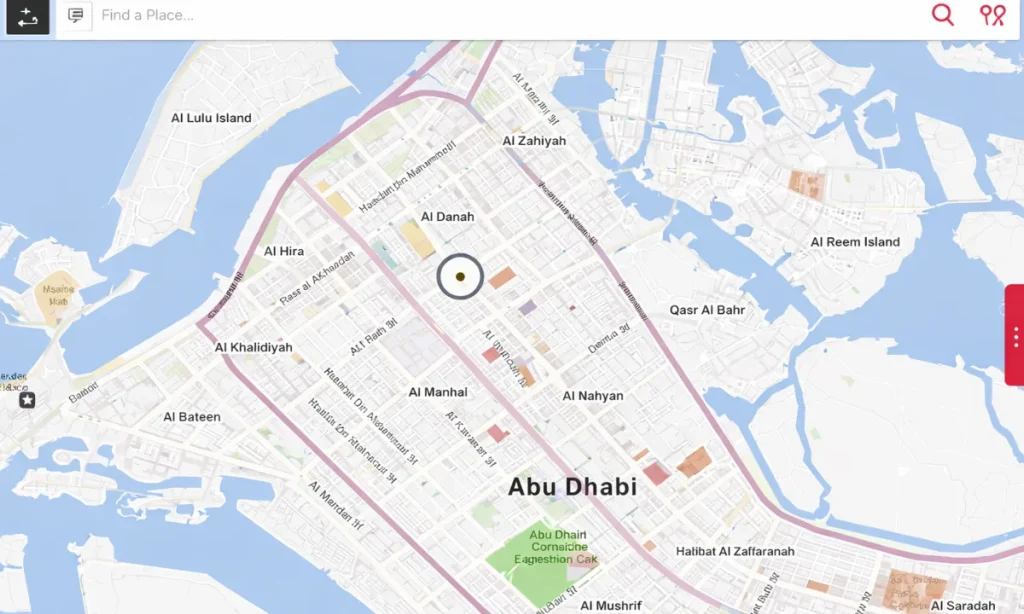
Upon launching the DARBI app, users are presented with a comprehensive interactive map covering the entire Emirate of Abu Dhabi.
The map supports two viewing modes:
Users can freely zoom in and out to explore different areas, and the app automatically detects the user’s current location to help identify nearby transport options.
2. Real-Time Bus Services
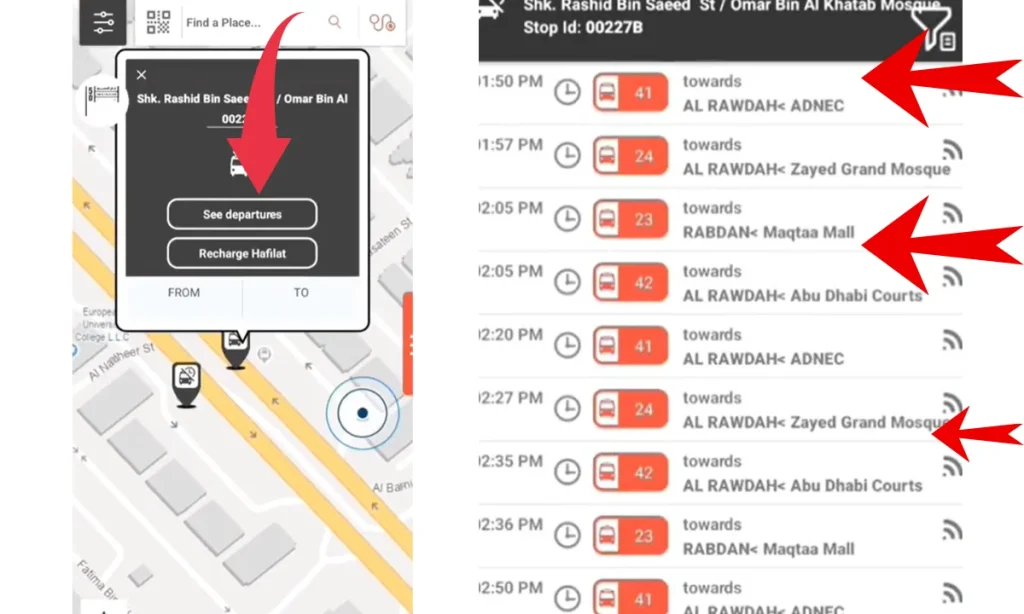
DARBI simplifies travel on Abu Dhabi’s bus network with a range of user-friendly features:
While the app provides generally accurate timing information, some users suggest cross-checking routes with other navigation tools for optimal planning.
3. Hafilat Card Management
One of DARBI’s most convenient features is the ability to manage your Hafilat bus card directly within the app:
The Hafilat card costs AED 10 and can hold a maximum balance of AED 150, valid for three months from the recharge date. Cards are available at Zayed International Airport, major bus stations (Bani Yas, Mussafah, Shahama, and Al Wahda), and Lulu supermarkets across Abu Dhabi.
4. Mawaqif Parking Payment
DARBI streamlines parking payments through its integrated Mawaqif service:
Fees are deducted from the DARBI e-wallet, eliminating the need for SMS payments or cash.
5. Taxi Booking Service
Users can conveniently book taxis through DARBI’s integrated system:
The service connects passengers with TransAD’s official taxi fleet, ensuring regulated fares and professional service.
6. Live Traffic Information
DARBI keeps drivers informed with real-time road updates:
These insights help commuters make informed decisions and save time.
7. Road Service Patrol (RSP)
DARBI offers free 24/7 roadside assistance through the Road Service Patrol feature:
Note:To request help, tap the ‘+’ button on the main screen, select “RSP,” complete the form, and pin your location.
8. Ferry and Marine Services
For water-based travel, DARBI provides comprehensive ferry information:
Ferry services operate daily with multiple trips. For example, the Dalma Al Dhanna route runs approximately four times daily, with each journey lasting about two hours.
9. Airport Information
DARBI integrates essential services for Zayed International Airport (formerly Abu Dhabi International Airport):
The A1 bus connects the airport to Abu Dhabi city center and operates 24/7, with a fare of AED 4 per trip using the Hafilat card.
10. Additional Smart Features
DARBI also includes several supplementary tools to enhance the travel experience:
Many features like the interactive map and bus route search work without registration. However, to recharge your Hafilat card, access trip history, or use the digital card feature, you must create a registered account.
How to Download & Install the Darbi App Process
Downloading the Darbi app is a simple and straightforward process. Follow the steps below based on your device:
Step 1: Choose Your App Store
Open the Google Play Store (Android) or Apple App Store (iPhone/iPad) depending on your device.


Step 2: Search for “Darbi”
Type “Darbi” in the search bar. Look for the app published by Integrated Transport Centre (ITC) or Abu Dhabi Mobility.
Step 3: Install the App
Tap Install or Get. The app is completely free with no hidden charges or subscriptions.
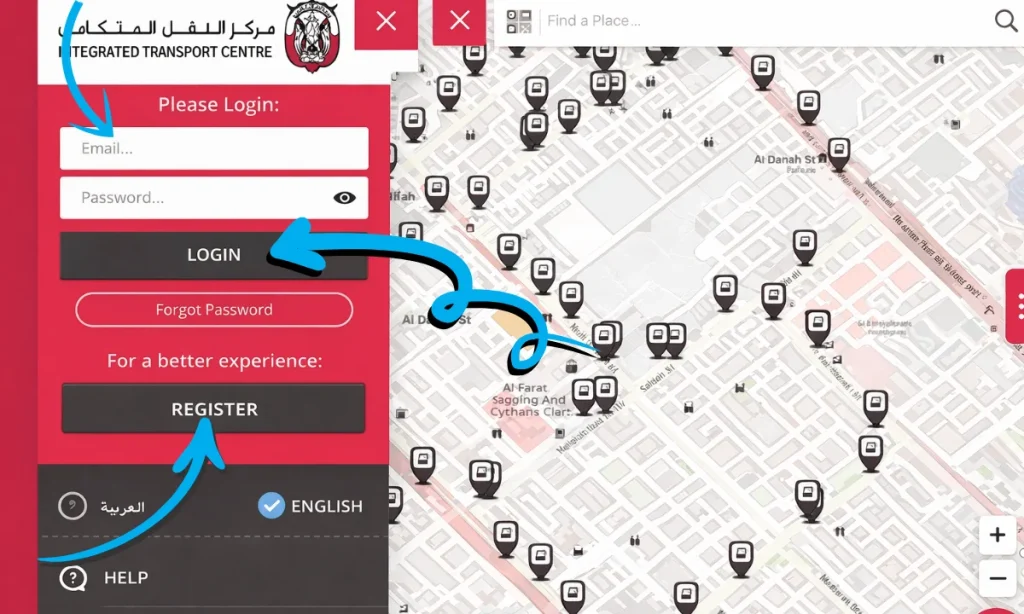
Step 4: Register & Login Darbi App
Open the app and create an account using your email address. This is required for features like Hafilat card recharging and trip history.
Step 5: Enable GPS & Notifications
Allow location access and push notifications to get accurate bus arrival times and real-time transport alerts near you.
The Darbi app is completely free to download and use. A minimum 3G network or Wi-Fi connection is required, and GPS access is needed for location-based features.
How to Use the DARBI App in Abu Dhabi
Based on a video demonstration, the following guide outlines how to use the DARBI app effectively for navigating transportation services in Abu Dhabi.
1: Getting Started
Step 1: Launch the App
Upon opening the app, you will be greeted with an interactive map displaying the entire Emirate of Abu Dhabi. This serves as the central hub for accessing all services.
Step 2: Explore Map Views
Use the map options button to switch between the following:
2: Finding Hafilat Bus Information
3: Recharging Your Hafilat Card
Step 1: Register Your Card
From the main menu, navigate to the Hafilat Card section.Select hafilat Recharge then Enter the serial number printed on the bottom of your card to register it within the app.
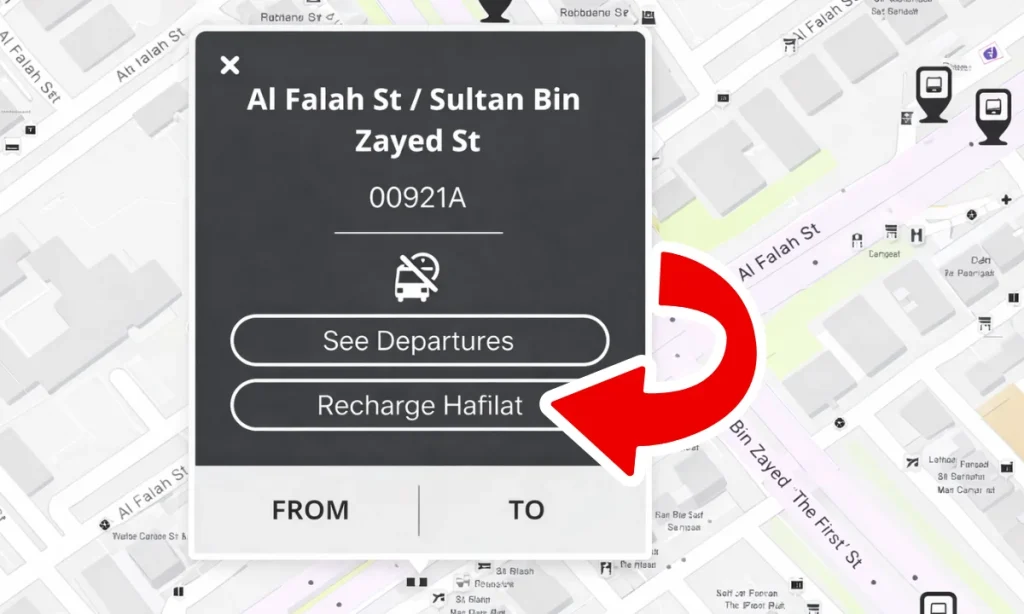
Step 2: Top Up Your Hafilat Balance
After registration, select the desired hafilat recharge amount and complete the payment using a credit or debit card. For online recharges, the updated balance typically reflects on the card within two hours.
4: Paying for Mawaqif Parking Via Darbi App
The Mawaqif integration in Darbi makes parking in Abu Dhabi significantly easier. Mawaqif is Abu Dhabi’s on-street parking management system, and Darbi allows you to pay, extend, and manage parking sessions entirely through the app, eliminating the need for SMS parking payments or searching for parking meters.
| Parking Type | Rate | Maximum |
|---|---|---|
| Standard Parking | AED 2 / hour | AED 15 / day |
| Premium Parking | Higher rate | Varies by zone |
| Sundays & Public Holidays | Free | — |
5: Using Additional Darbi App Features
1:Explore More Services
Tap the ‘+’ (plus) button on the main screen to access additional functionalities, including:
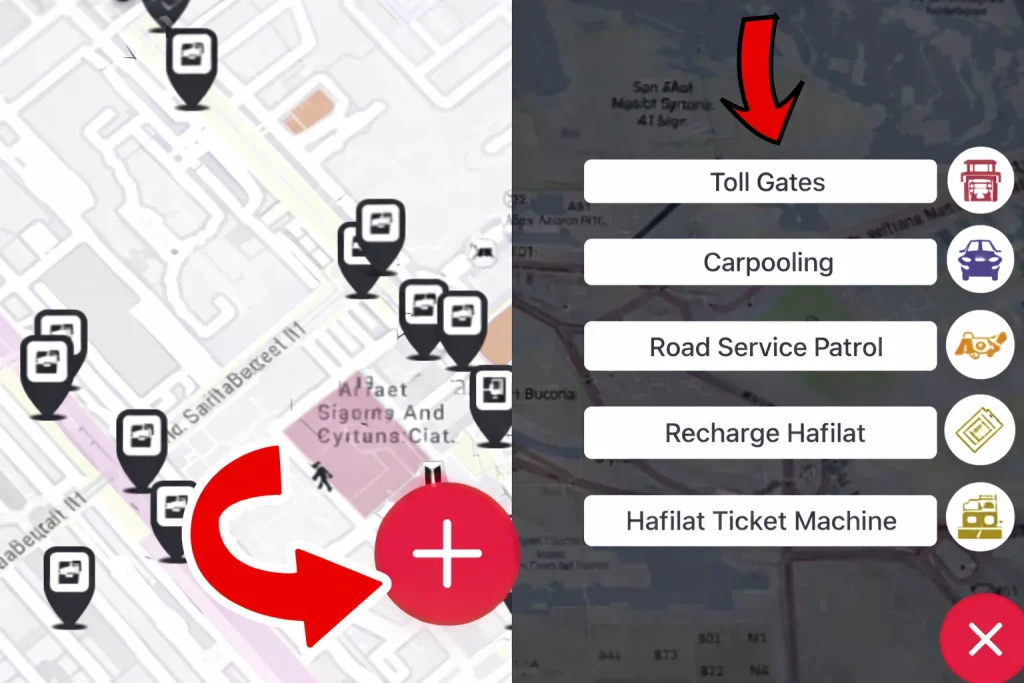
These features enhance convenience and provide comprehensive mobility support.
2: Digital Hafilat Card (NFC)
For users with NFC-enabled smartphones, Darbi offers a Digital Hafilat Card a virtual version that allows you to board buses by simply tapping your phone on the bus validator. This eliminates the need to carry a physical card. The NFC feature must be enabled on your device for this to work.
Abu Dhabi Mobility Services Integrated with Darbi App
| Service | Description | Operating Hours / Coverage |
|---|---|---|
| Standard Bus Service | Public bus network connecting Abu Dhabi City, Al Ain, and Al Dhafra | Extensive daily coverage across the emirate |
| Abu Dhabi Link | On-demand shared bus service for first- and last-mile connectivity | 6:00 AM – 11:00 PM |
| Mawaqif Parking | Public parking management system with digital payment options | Available across Abu Dhabi; free on Sundays and public holidays |
| TransAD Taxis | Official taxi service offering standard, family, and accessible vehicles | 24/7 service across Abu Dhabi |
Common DARBI App Issues and Solutions
Based on user feedback and reviews, some issues may occasionally occur while using the DARBI app. Below are the most common problems along with their recommended solutions to help ensure a smooth user experience.
Issue: App Crashes During Top-Up
This usually happens due to an unstable internet connection or temporary app glitches.
Solution: Make sure you have a stable internet connection. Close and reopen the app, then try again. If the issue continues, you can use alternative recharge methods such as Hafilat vending machines or the official website.
Issue: Recharge Balance Not Showing
Sometimes there is a delay between online payment and card update.
Solution: Online recharges may take up to two hours to reflect on your Hafilat card. For immediate updates, use a physical vending machine at any bus station.
Issue: Map Not Loading
This is typically caused by poor connectivity or cached data problems.
Solution: Check your internet connection and switch between Wi-Fi and mobile data. If needed, clear the app cache or reinstall the app.
Issue: Inaccurate Bus Timings
Real-time updates may vary due to traffic conditions or operational changes.
Solution: Allow extra time for your journey and cross-check schedules with official Integrated Transport Centre (ITC) sources or other navigation tools.
Issue: Cannot Find Hafilat Machine
Some users may find it difficult to locate nearby vending machines.
Solution: Tap the ‘+’ (plus) button in the DARBI app and select “Ticket Machines” to view all nearby Hafilat vending machine locations on the map.
Tips for Getting the Most from the Darbi App
Having used and researched the Darbi ecosystem extensively, here are practical tips that make a real difference in daily usage:
1: Maintain a Minimum Balance of AED 10
Always keep at least AED 10 on your Hafilat card. Running out of credit mid-journey can leave you stranded, especially on routes where recharge machines are not nearby.
2: Enable Notifications for Route Alerts
Turn on push notifications so you receive real-time alerts about bus delays, service disruptions, or route changes on your regular commute.
3: Use a Personalised Card for Loss Protection
A personalised Hafilat card costs only AED 5 and protects your balance if the card is lost or stolen. An anonymous card offers no such protection.
4: Buy a Monthly Pass If You Commute Daily
At AED 80 per month, the monthly pass offers exceptional value if you take the bus more than 40 times per month saving you money on every single trip.
5: Top Up in Advance, Not at the Last Minute
Online recharges via the app can take up to 2 hours to reflect. Always top up the night before rather than minutes before your journey.
6: Use the Geofeedback Feature
If you experience poor service quality, long wait times, or infrastructure issues, use the Geofeedback feature to report it directly to ITC. Your feedback actively helps improve the network.
Benefits of the Hafilat DARBI App
FAQs About Hafilat DARBI App
Is the Darbi app free to use?
Yes, the Darbi app is completely free to download from Google Play Store, Apple App Store, and Huawei AppGallery. There are no subscription fees or hidden charges for using the app itself.
Can tourists use the Darbi app?
Absolutely. The Darbi app is ideal for tourists visiting Abu Dhabi. You can buy an anonymous Hafilat card for AED 10 from the airport or bus stations and use it immediately. The app’s interactive map and bus search features are accessible without registration.
What is the difference between the old DARB app and the new DARBI app
DARB was the original name of the app. It was later rebranded as DARBI with significant improvements to the user interface, added features such as Hafilat card recharging, Mawaqif parking payments, ferry schedules, and an enhanced interactive map with satellite view. DARBI is the current, fully updated version and is the one you should download.
Conclusion
The Darbi App stands as a powerful all-in-one mobility solution, transforming how people navigate Abu Dhabi. With smart features, real-time insights, and seamless payments, it simplifies daily travel, enhances efficiency, and supports a modern, sustainable transport system for residents and visitors alike with unmatched convenience and reliability.
Source
Darbi App
Noura al Noman
I’m Noura Al Noman, an author at hafilatbalancechecksae.com. I write clear and informative guides about Hafilat balance checks, card services, and public transport in the UAE. My goal is to provide accurate, user-friendly information that helps readers complete tasks quickly and easily.